


Spotlight by Verizon Connect
3.6206.00 Reviews
App Specs
- Version
- 3.1.0.1175
- Updated On
- License
- Free
- Downloads
- 100,000+
- Developer
- Verizon Connect
- Categories
- Maps & Navigation
- Platform
- Android
Screenshots
 Analysis by AppCompare
I find Spotlight by Verizon Connect easiest to judge by asking a practical question: do you need a mobile view of vehicles and drivers that are already part of a managed fleet, or are you mainly looking for directions for your own trips? This is a fleet-management app in the maps and navigation space, not a general-purpose route planner. That distinction matters more than the map itself. I would consider it when coordinating work vehicles and checking what is happening across a team, but not as a replacement for the navigation app I use to get from one place to another.
The app is free to download, rated for Everyone, and developed by Verizon Connect. Its 3.6 average from around 1,400 ratings suggests a mixed reception rather than universal approval; that is a useful prompt to test how it fits your organization’s existing setup instead of assuming it will suit every driver or dispatcher. It has been available since August 9, 2016, and the current version is 3.1.0.1175. For me, the central decision is not whether fleet visibility sounds useful, but whether the people who need that visibility can act on it without adding another confusing step to their day.
Getting Started with Spotlight
First off, let’s talk about how easy it is to get up and running with Spotlight by Verizon Connect. Downloading the app was a breeze, and setting it up was even easier. The interface is super intuitive, so even if you’re not a tech wizard, you’ll find your way around in no time. The app is available for both Android and iOS, so it’s pretty much got everyone covered.
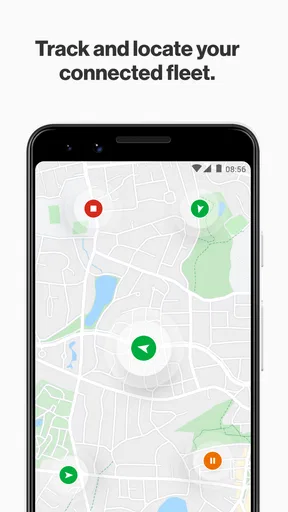
Once you’re all signed in, you’re greeted with a dashboard that gives you an overview of your entire fleet. It’s like having a bird’s eye view of your operations, and let me tell you, it’s pretty impressive. You can see everything from vehicle locations to driver activity, all in real-time. It’s like having a magic map that shows you exactly what’s going on at all times.
Features That Make Life Easier
Now, let’s dive into some of the features that really stood out to me. One of the coolest things about this app is its ability to track vehicles in real-time. You can literally watch your vehicles move on the map, and it’s kind of mesmerizing. Not only does this help with logistics, but it also gives you peace of mind knowing where your assets are at all times.
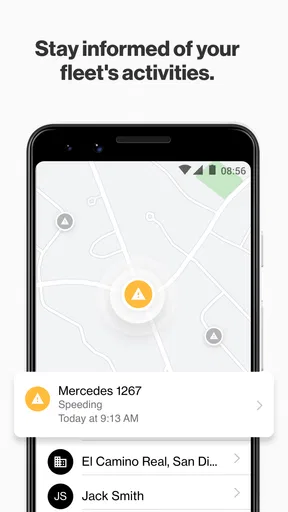
Another nifty feature is the ability to monitor driver performance. You can see how fast they’re going, how efficiently they’re driving, and even get alerts for things like harsh braking or rapid acceleration. It’s like having a little coach riding along with them, helping to improve safety and fuel efficiency.
And don’t even get me started on the maintenance reminders. This app keeps track of upcoming service needs, so you never miss an oil change or tire rotation again. It’s like having a personal mechanic that keeps you on schedule, which can save a ton of headaches down the road.
Worth Reading Before You Choose

EA SPORTS FC Mobile 26 Is a Bigger Football Game, but It Takes Time

Flipboard Shows What News Apps Must Do Beyond the Feed

Switching to Android Auto Means Rethinking Your Driving Routine

Google Calendar Makes a Crowded Week Easier to Manage

Ludo King Makes the Most of the Minutes Between Plans

Baby Panda World Brings Quick Play to Modern Phones, but Its Game Library Feels Busy
Putting Fleet Visibility to Work
The strongest use case I see is a dispatcher handling several jobs at once. If a customer calls asking whether a crew is nearby, checking the fleet map can be more useful than phoning each driver in turn. A small delivery or service business could also use the view to spot a vehicle that has not progressed as expected and decide whether to adjust the day’s plan. The value is not simply watching dots move; it is having enough context to make a calmer, quicker decision.
There is a useful workflow here: check the overall picture first, then focus on the particular vehicle or driver relevant to the question. That keeps a busy map from becoming a distraction. I would also agree internally on who should respond to alerts and what counts as a reason to contact a driver. Otherwise, a safety notification can become just another ping that people ignore, or an unnecessary interruption while someone is working.
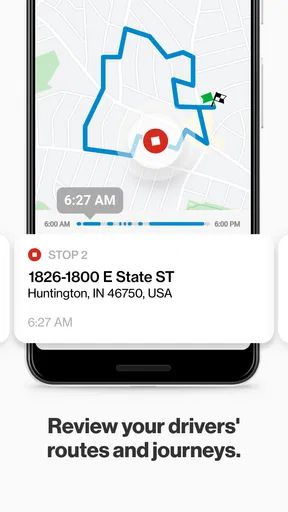
For a manager, vehicle location and driving events can support a more specific conversation than a vague complaint about how a trip went. I would treat the information as a starting point for asking what happened, not as a complete account of a driver’s day. Traffic, work conditions, and the details around an event matter. Used with that restraint, visibility can help a team look for patterns and coach consistently rather than making snap judgments from one alert.
The User Experience
Okay, so let’s talk about the user experience, because honestly, it’s pretty stellar. The app is sleek and modern, with a clean design that makes everything easy to find. Navigation is smooth, and everything loads quickly, which is a huge plus in my book. There’s nothing worse than a laggy app when you’re trying to get stuff done, am I right?
Plus, the app is super customizable. You can set up alerts and notifications to suit your needs, so you’re only getting the info that matters most to you. It’s like the app is tailor-made just for you, and who doesn’t love a little personalization?
When Another Kind of App Fits Better
Spotlight makes the most sense when a business already manages vehicles, drivers, and assets as a group. A standalone navigation app is usually the better choice for an individual who wants turn-by-turn directions, route discovery, or help planning a personal journey. Those tools are built around getting one person to a destination; Spotlight’s appeal is the operational view across a fleet. I would not choose it just because I want a map on my phone.
There is also a difference between fleet oversight and route optimization. Seeing where vehicles are and reviewing driver activity can help someone coordinate, but that is not the same as proving that the app will automatically plan the best sequence of stops for a particular operation. If route planning is the main requirement, I would compare tools specifically designed around dispatch and route planning before committing to a fleet-viewing app.
For a team that already uses Verizon Connect, Spotlight may feel like a convenient mobile companion to its broader workflow. For a business starting from scratch, the first question should be whether its fleet-management arrangement supports the app and whether staff will actually use a phone for oversight. A desktop-based process may be more comfortable for someone who spends the day studying schedules, while the mobile view is more compelling for a manager who needs quick checks away from a desk.
Small Habits That Prevent Bigger Friction
One practical tip is to make notification choices deliberately rather than turning on every alert at once. Start with the events that need timely action, such as a location check or a driving behavior that merits follow-up, then refine the settings as the team learns what is genuinely useful. This helps keep important messages visible and reduces the chance that drivers or managers will tune out the app.
I would also decide what “real-time” information means for your workday before relying on the map for customer promises. A location view helps with coordination, but it should not be treated as a guarantee that a vehicle will arrive at a precise time. If someone is waiting for a service visit, use the map as one piece of context and leave room for changes on the road.
Maintenance reminders can be useful as a prompt to keep service needs in view, but I would keep the organization’s normal maintenance records and checks in place too. A reminder is most valuable when it leads to a booked inspection or a recorded task; it is not a substitute for a person confirming that work was completed. That small distinction makes the app part of a process rather than the process itself.
Switching Is More Than Installing an App
Before moving a team to Spotlight, I would map out who needs access, what decisions they will make in the app, and how drivers should respond to monitoring. A dispatcher, an owner, and a driver may all have different reasons to look at fleet information. Agreeing on those roles early can prevent an otherwise capable tool from feeling intrusive or unclear.
The other switching cost is habit. If a team already calls drivers for updates or relies on a separate dispatch routine, changing that practice takes more than putting a new icon on a phone. I would introduce the app around one everyday task, such as answering location questions, then expand its role only when people find that it saves effort. That is a more realistic test than expecting every feature to reshape operations immediately.
Readers may also wonder whether this is useful for a one-person operation. It can be worth considering if that person manages several vehicles or needs to keep an eye on assets while away from a desk, but it is likely unnecessary for someone who simply drives one vehicle and wants directions. The distinction is about the job to be done, not the size of the phone or the map.
As an Android user, I would check the device’s compatibility before installing: the app requires Android 9 or later. That matters for a business with older phones, where a fleet-wide rollout can become uneven if some devices cannot run the current app. For iOS users, the app is available there as well, so the choice is not limited to one mobile platform.
Wrapping It Up
So, what’s the final verdict on Spotlight? In my opinion, it’s a must-have for anyone managing a fleet, big or small. The convenience and peace of mind it offers are invaluable, and the features are designed to make your life easier. From real-time tracking to driver performance monitoring, it’s packed with tools that help you stay on top of your game.
If you’re ready to take your fleet management to the next level, I’d definitely recommend giving this app a try. It’s like having a superpower in your pocket, and trust me, once you start using it, you’ll wonder how you ever managed without it. So go ahead, hit that download button, and see for yourself!
My recommendation is more specific: try Spotlight if your daily work involves checking several vehicles, responding to location questions, or following up on driving and maintenance details. I would skip it if your only need is personal navigation, or if your team has no practical plan for using fleet information. The free download makes a test less of a commitment, but a useful trial still depends on matching the app to a real workflow and making sure the right people can access it.
For a small business, I would begin with one clear question: does this mobile overview save enough time or improve coordination enough to justify changing how the team shares updates? If the answer becomes yes in normal work, Spotlight has a sensible role. If the map and alerts become extra administration, a simpler communication routine or a different kind of navigation tool may be a better fit.
Pros
- User-friendly interface enhances navigation.
- Real-time tracking ensures accurate updates.
- Customizable alerts for specific needs.
- Detailed reporting aids in performance analysis.
- Integrates well with other systems.
Cons
- May require a stable internet connection.
- Initial setup can be time-consuming.
- Limited offline functionality.
- Premium features may be costly.
- Occasional lag in data syncing.
FAQs for Spotlight by Verizon Connect
What is Spotlight by Verizon Connect, and what features does it offer?
Spotlight by Verizon Connect is a fleet management app designed to help businesses track and manage their vehicles in real-time. It offers features such as GPS tracking, driver behavior monitoring, maintenance scheduling, and route optimization. The app aims to improve efficiency and reduce operational costs by providing detailed insights into fleet performance.
Is Spotlight by Verizon Connect compatible with both Android and iOS devices?
Yes, Spotlight by Verizon Connect is available for both Android and iOS devices. It is designed to be user-friendly and provides seamless integration across different platforms, allowing fleet managers and drivers to access important information on the go. Ensure your device meets the app's system requirements for optimal performance.
How does Spotlight by Verizon Connect improve fleet safety and efficiency?
The app enhances fleet safety by monitoring driver behavior, such as speeding, harsh braking, and rapid acceleration. It provides real-time alerts and reports that help managers address risky driving practices. Additionally, the route optimization feature ensures efficient fuel usage and timely deliveries, contributing to overall operational efficiency.
What are the subscription costs associated with using Spotlight by Verizon Connect?
Spotlight by Verizon Connect typically requires a subscription, with costs varying based on the size of the fleet and specific features needed. Pricing details can be obtained by contacting Verizon Connect directly for a tailored quote. Subscriptions usually include customer support and regular software updates to ensure optimal performance.
How does the app handle data privacy and security?
Spotlight by Verizon Connect prioritizes data privacy and security by implementing robust encryption protocols and secure data storage solutions. It complies with industry-standard regulations to protect sensitive information. Users can rest assured that their data is handled responsibly, with access restricted to authorized personnel only.


